Outcome
By the end of this lesson you'll have a daily inbox routine that takes about ten minutes: a quick sweep that sorts what's in front of you, a batch of draft replies you edit instead of write, and a short "waiting on" list so nothing you were promised or owe goes missing. You'll also leave with a small bank of reply prompts you can paste in any day of the week.
Concept
Email feels heavy because every message arrives with the same weight. A newsletter, a client question, and a scheduling ping all sit in one pile, and your brain treats the pile as one big task.
The fix is to separate deciding from doing. We'll use a three-beat routine we call Sweep, Draft, Track:
- Sweep — decide what each message needs (a reply from you, a quick answer, a later look, or nothing).
- Draft — hand the routine replies to AI for a first pass.
- Track — write down what you're waiting on, so follow-ups stop living in your head.
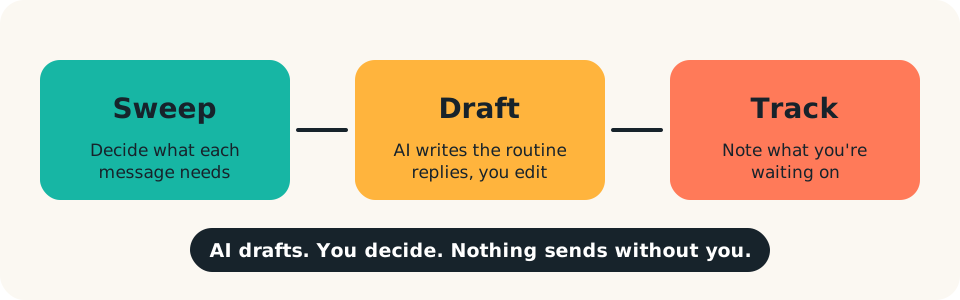
The rule underneath all three: AI drafts, you decide. It never sends anything, and it never makes a call about a person, a price, or a promise on your behalf. That keeps the routine safe, and it's what makes handing off the rest comfortable.
Build
Set aside about 20 minutes once to build the kit. After that the daily routine runs in ten.
Part 1: The sweep prompt. Sorting works best when the AI sees only what it needs. Copy the sender and subject lines of your latest 15 to 20 messages (not the message bodies) into this:
Here are the sender and subject lines of my recent emails:
[PASTE LIST]

For each one, tell me whether it is most likely:
A) needs a personal reply from me
B) a routine reply I could draft quickly
C) informational, no reply needed
D) unclear, I should open it

Give a one-line reason for each. Base this only on what I've pasted. If you
can't tell, say D.
You're getting a starting map, not a verdict. Anything labeled A or D you open yourself.
Part 2: A voice sample. Pick two or three short emails you've sent that sound like you. Save them in a note called "My voice." You'll paste these ahead of drafting requests so replies come back sounding like you rather than like a form letter.
Part 3: The reply prompt.
Here are two examples of how I write emails:
[PASTE 2 SAMPLE EMAILS]

Here is an email I received:
[PASTE EMAIL — remove names and details you don't need to share]

Draft a reply in my voice that:
- answers: [WHAT I WANT TO SAY, IN ONE OR TWO SENTENCES]
- is under [NUMBER] words
- ends with one clear next step

Do not add commitments, dates, or prices I haven't given you. If you need
information to reply well, ask me instead of guessing.
The last two lines matter most. They stop the draft from promising things you never agreed to.
Part 4: The reply bank. Look at your sent folder for replies you write over and over: declining a meeting, asking for a missing file, a polite "not this quarter." Turn each into a one-line instruction you can drop into the reply prompt, such as "decline politely and offer [ALTERNATIVE]." Keep them in the same note as your voice samples.
Part 5: The tracking prompt. At the end of your session, paste a short list of the emails you replied to:
These are replies I sent today: [PASTE SUBJECT LINES + ONE-LINE SUMMARY EACH]

List the ones where I'm probably waiting on a response. For each, suggest a
sensible follow-up date and a one-sentence nudge I could send. Put anything
where a deadline matters first.
Copy the result into a running note titled "Waiting on."
A worked example
Here's what a run of Part 3 can look like. The email and reply below are made-up examples, shown only to illustrate the shape of the output.
Incoming (illustrative): "Hi, could you send over the updated schedule for the workshop? We're trying to finalize the room booking."
My instruction: Say I'll send it by end of day Thursday. Under 60 words.
Draft (illustrative): "Hi, thanks for checking in. I'll send the updated workshop schedule by end of day Thursday so you can finalize the room. Let me know if anything on your side changes before then."
Short, in a plain voice, one commitment, and the commitment is the one you supplied. That's the standard to check against.
Run
Try it now (5 minutes). Open your inbox. Copy the senders and subjects of your last 15 messages and run the sweep prompt. Open the A and D items yourself. Pick one B item, run the reply prompt on it with your own one-line instruction, and edit the draft until you'd happily send it. Then send it.
Guardrails: what a human must verify.
- Privacy. Don't paste confidential or customer information into any tool your workplace hasn't approved. Strip names, account numbers, and anything sensitive from what you paste, or use a work-approved tool.
- Dates, amounts, and promises. Read every number and commitment in a draft against what you actually decided. AI will happily write a polite deadline you never agreed to.
- Tone with people you know. A draft can sound fine in general and still be wrong for this person this week. You know the history; it doesn't.
- Never auto-send. Every reply goes through your eyes first.
- Keep personal, sensitive, and high-stakes messages (conflict, hiring, money, anything legal) fully yours.
Make it a habit. Run the routine once a day at a fixed time. Glance at "Waiting on" before you log off, and cross off what's resolved. After a week, review your reply bank: add the replies you wrote by hand more than twice, and trim any prompt that keeps needing heavy edits.
Checkpoint.
- I have a saved sweep prompt and a reply prompt.
- I have a "My voice" note with two or three sample emails.
- I've edited and sent at least one AI-drafted reply.
- I have a "Waiting on" note with at least one entry.
- I know which kinds of messages I will never hand off.
Next, we turn the same Sweep, Draft, Track idea on your calendar in Automate your meetings.