Outcome
You get good results on the first or second try, instead of rewriting the same question five times and hoping.
Concept
"Prompt engineering" sounds like a specialized skill, but almost all of the value comes down to four simple levers. Once you know them, everything else people talk about is really just a variation on one of these.
1. Context. This is the single highest-leverage lever. The AI doesn't know what you know unless you tell it — who the audience is, what's already been tried, what the constraints are. A vague prompt with no context gets a generic, safe answer. The same prompt with two sentences of real context gets something specific and useful.
2. Examples. If you can show what "good" looks like, do it. "Write it like this" with a sample is dramatically more reliable than describing the style in the abstract. This is especially powerful for tone and format — show, don't just tell.
3. Iteration. Your first result almost never needs to be your last. Treat the first response as a draft, then give specific feedback: "make this shorter," "more casual," "cut the second paragraph, expand the third." This is faster than trying to write the perfect prompt up front, and it usually gets you a better result.
4. Output review. Read what comes back like an editor, not a passive reader. Does it actually match what you asked for? Did it invent anything? Would you send this as-is? This lever isn't about the prompt at all — it's about not skipping the last step.
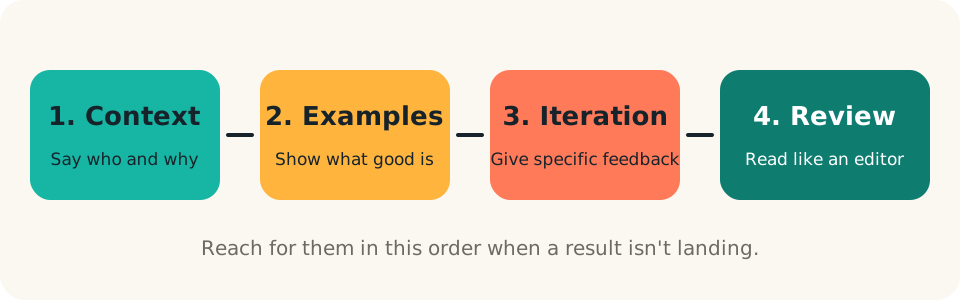
Everything else — "chain of thought," "few-shot prompting," special phrasing tricks — is really just a specific application of one of these four. You don't need to memorize jargon. You need to reach for context, examples, iteration, and review, in that order, whenever a result isn't landing.
A worked example: the weekly update
Suppose you send your team a weekly update and it takes you 30 minutes of staring at a blank page.
Pass 1, bare prompt:
Write a weekly team update.
Illustrative output: "Hi team, here is this week's update. We made good progress on our goals and look forward to next week." Nothing in it is wrong, and nothing in it is useful.
Pass 2, plus context and an example:
Write my weekly team update. Audience: a team of six who read it on Monday
morning and want to know what changed and what's needed from them.
This week: [WINS], [BLOCKERS], [NEXT WEEK'S PRIORITIES].
Match the style of this past update: [PASTE A PAST UPDATE YOU LIKED].
Keep it under 150 words.
Illustrative output: three short sections (done, stuck, next), written in the tone of your sample, with a specific ask near the end: "Need a decision on [BLOCKER] by Wednesday."
Pass 3, iteration:
Good structure. Cut the opening sentence, make the blocker more urgent, and move
the ask to the very top.
Three passes, each adding one lever. The final version took about two minutes and sounds like you, because you supplied the voice.
Copy-paste prompts
Context plus example in one:
Task: [WHAT YOU NEED].
Audience: [WHO WILL READ OR USE IT].
Constraints: [LENGTH, TONE, MUST-INCLUDE].
Here's an example of the style I want: [PASTE SAMPLE].
A targeted revision request:
Revise your last answer. Keep [WHAT WORKED]. Change [WHAT DIDN'T] to
[WHAT YOU WANT INSTEAD]. Don't add anything new.
A review pass you can run on any output:
Review your own answer above as a skeptical editor. List any claims that might be
invented, anything I should verify, and one thing you'd cut.
Build
Pick one real task you actually need done. Run it through all four passes, adding one lever each time, and notice the result improve:
- Bare prompt: Just ask for the thing, no extra detail.
- + Context: Add two or three sentences of relevant background.
- + Example: Add a sample of the tone/format you want.
- + Iteration: Give one round of specific feedback on the result and ask for a revision.
By pass four, compare it to pass one. That gap is the whole lesson.
Try it now (5 minutes)
Choose a message you'll really send this week. Run passes one through four, saving each result in a note so you can compare them side by side.
Done when: you have four versions saved, you've circled the single change that improved things most, and the final version is something you'd actually send after a light edit.
Run
When a result isn't working, don't start over from scratch — diagnose which lever is missing:
- Generic or vague? → Add context.
- Wrong tone or format? → Add an example.
- Close but not quite right? → Iterate with specific feedback instead of a brand-new prompt.
- Sounds right but you're not sure it's accurate? → That's the review step from Lesson 1 — go verify.
Save your best prompts once you've dialed them in — the ones you'll reuse for recurring tasks (weekly reports, common email types, standard summaries). That's the start of your own prompt library, and it means you never have to solve the same prompting problem twice.
Common mistakes
- Vague feedback. "Make it better" gives the assistant nothing to act on. Say what to change and in which direction.
- Starting over every time. Revising inside the same conversation keeps the context you've already built.
- Pasting an example you don't want copied. The assistant will mirror structure and tone closely, so pick a sample you'd be happy to resemble.
- Piling on rules. Five clear constraints beat fifteen competing ones.
Checkpoint
- I can name the four levers: context, examples, iteration, review.
- I've run one real task through all four passes and compared pass one to pass four.
- When a result is off, I diagnose the missing lever before rewriting.
- I've saved at least one prompt I expect to reuse.